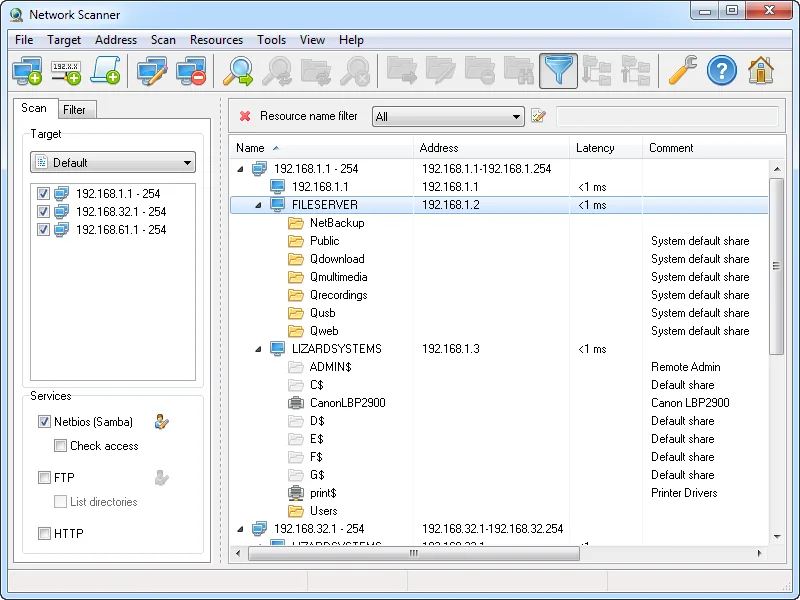
Almost every inherited network has one: a folder called “Scans” on an old NAS, set up years ago for the copier and still writable by every account in the building. Nobody at the client remembers it, which is exactly why it matters when you take over. An asset inventory tells you the NAS exists; it rarely tells you that any user can overwrite its contents. LizardSystems Network Scanner is built around that narrower question — what is shared here, and what can a given account do with it. It also carries two caveats worth weighing first: its age and its licence terms.
Use with authorization only. Scan only your own networks or client networks you manage under a signed agreement that covers discovery and security review. Record that authorization in the client file before the first scan.
What LizardSystems Network Scanner does
Network Scanner is a Windows desktop application from LizardSystems. The vendor calls it an “IP scanner tool for analyzing networks”, but its real focus is shared resources rather than hosts or open ports. You give it IP ranges, address lists or computer names — expressions such as 192.168.1-2,5,20,25-27.1-254 are accepted — and it works through them with multiple threads.
For each machine that responds, it retrieves the NetBIOS or domain computer name and lists what that machine shares: ordinary SMB/NetBIOS (Samba) shares, including hidden and system shares, plus FTP and web servers. It then checks read and write access to each resource, either for the account you are signed in with or for another user you specify. Online status comes from ping, or from a connection attempt to ports you choose; that is a liveness check, not a general port scanner.
Results appear as a tree of computers and resources. You can filter by resource type, access rights or name, open a share in Explorer or a browser, map it as a network drive, and save a scan to reopen later. Exports go to HTML, TXT or XML. Scanning does not need administrator rights.
Where it helps an MSP
A share-exposure check during onboarding. Run it from a standard domain user account in week one and the access columns show what an ordinary employee — or ransomware running as that employee — could reach and change. Writable shares on old desktops, a forgotten NAS folder, an FTP service on a device nobody listed: each becomes a line on the remediation list.
Testing another account’s rights. Because it can check access as a specified user, you can compare a front-desk account with a finance account without signing in at each workstation.
Evidence to hand over. A dated HTML export of writable shares is a tidy attachment for the onboarding report, and a before picture once permissions are tightened.
No footprint on site. It runs on the technician’s Windows machine; there is no agent or collector to leave behind.
Where it falls short — and who should skip it
No new release since July 2021. The latest version is v21.07, released on July 7, 2021 — more than five years ago at the time of writing. The vendor’s supported list runs from Windows 7 to Windows 10 and Server 2016. Windows 11 is not listed, nor are Server 2019, 2022 or 2025. Whether it runs there is unverified, so try it on a non-production machine first.
Not a discovery or inventory tool. The vendor does not claim MAC address or hardware-vendor detection, SNMP, IPv6 scanning or a command-line mode. For a quick picture of every device on a subnet, Angry IP Scanner fits better; for a register that stays current, Lansweeper.
A snapshot, not a system. There is no scheduling, history or alerting.
Security tools may react. Enumerating shares across a subnet resembles lateral movement, which endpoint detection watches for. Warn the client’s security provider first.
Skip it if your RMM or inventory platform already reports share permissions, or if your policy rules out unmaintained software on technician machines.
Who it suits
It suits a small, Windows-centric MSP that wants a dedicated share-permission check, and internal IT teams inheriting undocumented file servers. Picture a three-tech shop taking on a thirty-seat architecture practice with two NAS boxes: one scan as a standard user, exported to HTML, becomes the file-share section of the client onboarding checklist.
Licensing and cost
The vendor’s product and purchase pages offer a Personal License that is free and perpetual but for non-commercial use only. Client work — and, by the same logic, company IT work — is commercial use, so it needs the Business License: at the time of writing, US$79.95 per licence, perpetual, with one year of updates and email and ticket support. The FAQ says every installation on a separate machine needs its own licence, so budget one per technician PC. Volume and site licensing are arranged with the vendor directly. Check the vendor’s current purchase page before buying.
The vendor’s wording on evaluation is not consistent. The FAQ describes an unregistered copy that works without functional limits during an evaluation period, on one computer, with nag screens; the contact page says every product has a 30-day evaluation; the purchase page simply calls the personal licence free, without saying how it is activated. Read the EULA and FAQ yourself, and treat any use on a client network as needing a paid licence from the first scan. Note, too, that “one year of updates” means little while nothing new has shipped since 2021.
How it compares
In our network and asset tools section, this is the only product centred on share permissions. Angry IP Scanner is free and open source for commercial use, adds MAC vendor lookup and port checks, but does not test read or write access. Lansweeper builds a lasting inventory, Auvik looks after switches and firewalls, and Wireshark shows what a device actually sends on the wire.
Getting it safely
We host nothing and have no commercial relationship with LizardSystems. Get Network Scanner only from lizardsystems.com, typing the address yourself. The vendor publishes a SHA-256 value on its v21.07 release page; compare it with Get-FileHash .\file -Algorithm SHA256 in PowerShell before running anything. Our where to get page covers hash checks in more detail.
FAQ
Is LizardSystems Network Scanner free for MSP work?
No. The free Personal License covers non-commercial use only. Using it on client networks requires the Business License, priced per machine; check the vendor’s purchase page for the current figure.
Does it support Windows 11?
Windows 11 is not listed; the supported systems stop at Windows 10 and Server 2016. Test it on a spare machine first.
Is it a port scanner?
No. It can check whether a host answers on ports you specify, but only to decide whether it is online.